MSP & Multi-Site Monitoring with NetAlertX
NetAlertX supports centralized monitoring across remote sites, customer environments, branch offices, VLANs, and isolated networks using distributed Sync Nodes.
Deploy lightweight NetAlertX instances inside remote or segmented networks, then securely aggregate device inventory and network visibility data into a central hub for unified monitoring, alerting, and asset management.
Common MSP & Multi-Site Use Cases
Managed Service Providers (MSPs)
Monitor multiple customer environments from a centralized dashboard while keeping scanning local to each customer site.
Typical deployments include:
- Customer branch offices
- Retail stores
- Warehouses
- Small business environments
- Segmented enterprise VLANs
Network Operations Centers (NOCs)
Create centralized "Eyes on Glass" monitoring dashboards using synchronized remote collectors.
Common NOC setups include:
- Wallboard dashboards
- Dedicated "Down Devices" views
- Site-(node)specific monitoring filters
- Prometheus/Grafana integrations
Isolated or Restricted Networks
Some environments cannot be scanned directly due to:
- VLAN isolation
- Firewalls
- VPN segmentation
- Layer 2 limitations
- Remote WAN locations
Sync Nodes solve this by running discovery locally and forwarding only inventory and monitoring data to the hub.
Architecture Overview
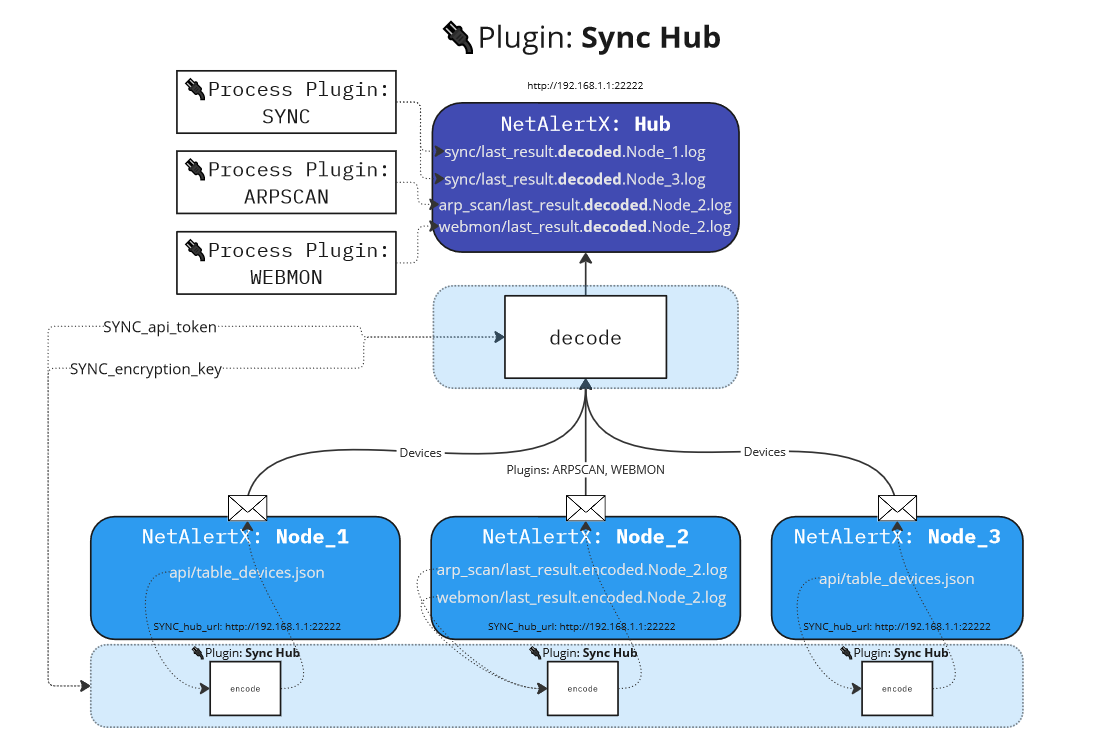
NetAlertX supports distributed monitoring using two primary roles:
| Role | Purpose |
|---|---|
| Hub | Centralized monitoring, alerting, dashboards, and inventory |
| Node | Remote collector performing local network discovery |
Each node scans its local network and synchronizes device data back to the hub.
Sync Modes
NetAlertX supports both PUSH and PULL synchronization models.
| Mode | Description |
|---|---|
| PUSH | Nodes send inventory data directly to the hub |
| PULL | The hub retrieves inventory data from remote nodes |
PUSH mode is typically recommended for MSP deployments because remote customer environments often block inbound access.
Device Ownership Models (SYNC_BEHAVIOR) in PULL mode
The hub can operate in different synchronization ownership modes depending on your operational requirements.
| Mode | Best For |
|---|---|
copy-new |
After initial discovery the hub becomes the long-term source of truth |
carbon-copy |
Fully managed remote appliances where nodes remain authoritative |
hub-defaults |
Centralized inventory management with hub-defined policies |
This flexibility allows NetAlertX to support both:
- centrally managed environments
- distributed autonomous sites
Example Deployment
Multi-Site MSP Deployment
Customer Site A ─┐
Customer Site B ─┼──► Central NetAlertX Hub
Customer Site C ─┘
Each customer site runs a lightweight NetAlertX node locally.
The central hub:
- aggregates inventory
- handles alerting
- provides dashboards
- exports metrics
- integrates with Grafana or external systems
Recommended MSP Features
For best results in multi-site environments:
- Configure descriptive
SYNC_node_namevalues - Use Workflows to auto-tag devices by location/site
- Use predefined "Down Devices" dashboards
- Enable Prometheus metrics export
- Use UI Filters to create site-specific views
Related Documentation
Summary
NetAlertX enables lightweight, centralized monitoring across distributed networks without the operational overhead of traditional enterprise monitoring platforms.
By combining distributed Sync Nodes with centralized dashboards, alerting, and workflows, NetAlertX can function as:
- a multi-site monitoring platform
- an MSP inventory dashboard
- a lightweight NOC monitoring solution
- a centralized network visibility platform for segmented environments