Change log
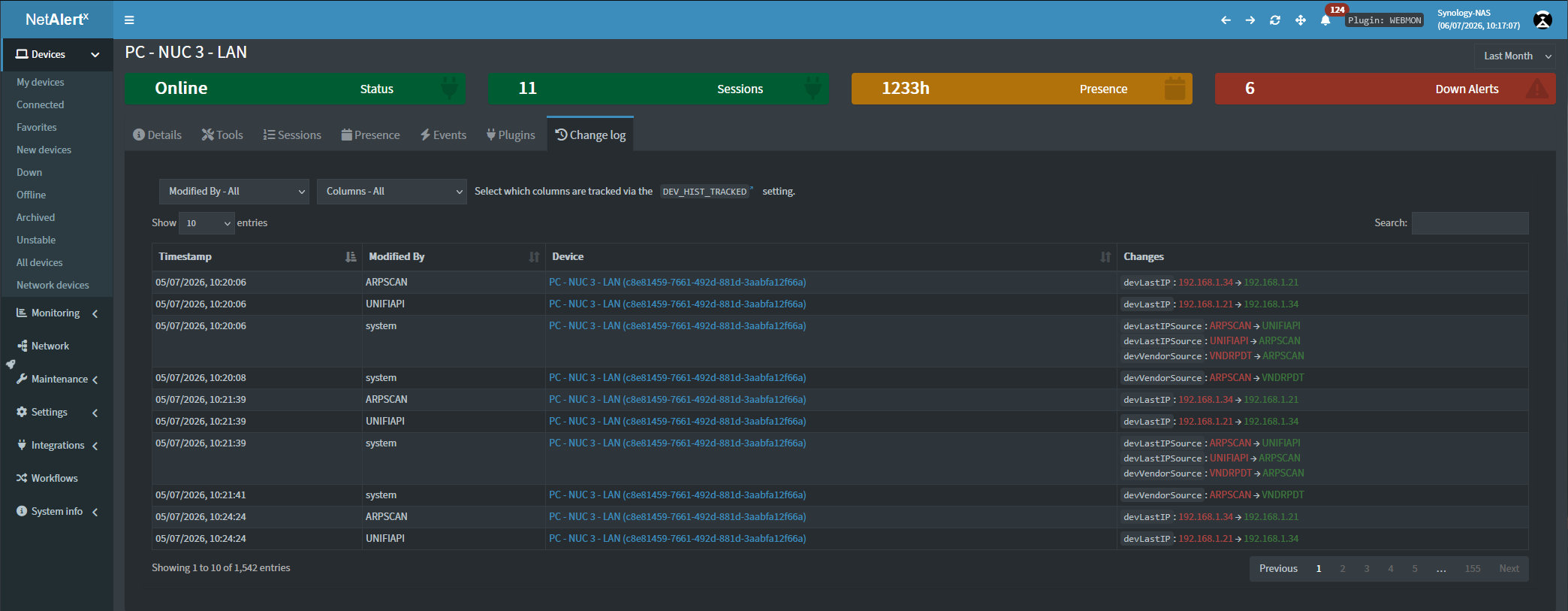
The Change log provides a historical record of changes made to your devices. It allows you to see what changed, when it changed, and what caused the change, making it easier to troubleshoot unexpected updates, audit configuration changes, and understand how device information evolves over time.
What is recorded?
Whenever a tracked device property changes, NetAlertX records:
- Time the change occurred
- Source that made the change
- Device that was updated
- Field that changed
- Previous value
- New value
Related changes that occur at the same time are grouped together into a single event, making it easy to see all updates from one scan or user action.
Understanding the Source column
The Source column identifies what caused the change.
Depending on the field, the source may be:
- A discovery plugin such as ARPSCAN, NSLOOKUP, UNIFIAPI, or another plugin that supplied the information.
- user:api for changes made manually through the NetAlertX interface or API.
- system for values calculated or maintained internally by NetAlertX.
This helps distinguish between information discovered automatically and changes made by users.
Filtering the history
The Change log includes filters to help locate specific events.
You can filter by:
- Source to view changes made by a specific plugin or user.
- Changed Field to display changes to a particular device property, such as IP address or hostname.
You can also use the search box to quickly find matching devices by GUID, values, or fields.
Viewing grouped changes
A single action often updates multiple properties on a device.
Instead of showing each field as a separate record, the Change log groups related updates together. For example, a network scan might update both a device's IP address and hostname at the same time. These changes appear together in one entry with each modified field listed underneath.
Retention
The amount of history retained is controlled by the Device History Days (DEV_HIST_DAYS) setting.
Older history entries are automatically removed once they exceed the configured retention period. this is maintained by the DBCLNP plugin.
Setting this value to 0 disables Change log recording entirely.
Choosing what to track
Not every device property needs to be recorded.
The Tracked Device History Fields (DEV_HIST_TRACKED) setting lets you choose exactly which device fields should be monitored. Tracking only the fields that are important for your environment can significantly reduce database growth while keeping the most useful audit information.
Performance considerations
Recording history introduces additional database writes whenever tracked fields change. For most installations the overhead is minimal, but on larger networks it can generate a substantial amount of historical data.
If you want to reduce storage usage or improve performance, consider:
- Tracking only the device fields that matter to you.
- Reducing the history retention period.
- Disabling the Change log entirely by setting
DEV_HIST_DAYSto 0.
These settings allow you to balance historical visibility with database size and performance. For more tips on how to optimize system resource use check the performance guide.